Create Life Long Clients
ProfitFlo will help you build long lasting client relationships on autopilot!

Create Life Long Clients
ProfitFlo will help you build long lasting client relationships on autopilot!
LATEST NEWS
"All-in-One Chat Now Supported in Customer Replied Trigger"
“Automate smarter based on exactly how your leads reply.”
- Paul Duncan
💬 All-in-One Chat Now Works with Customer Replied Trigger
Automation just became more precise for businesses using unified chat setups. You can now trigger workflows when a customer replies through an All-in-One Chat widget, giving you cleaner logic and more flexible filtering.
This update allows you to:
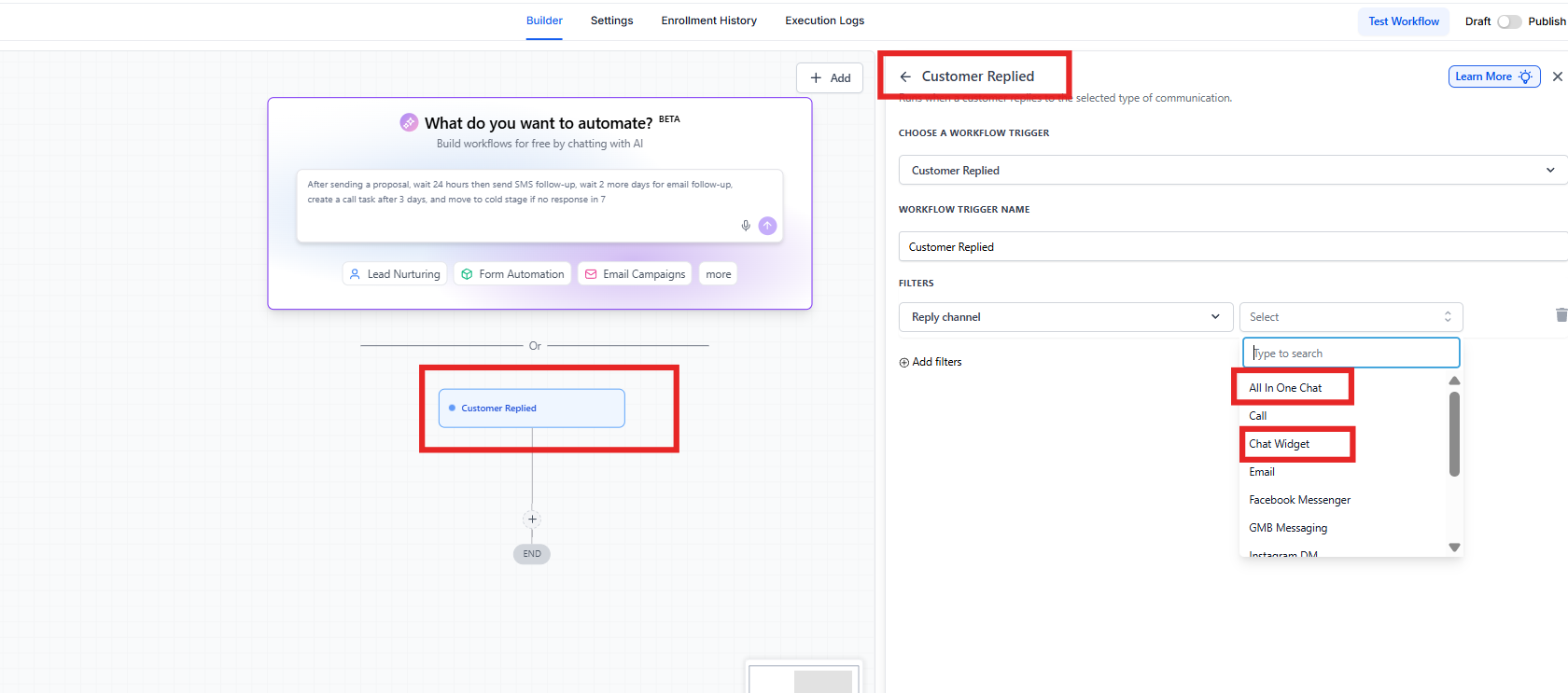
Select All-in-One Chat directly from the Reply Channel dropdown
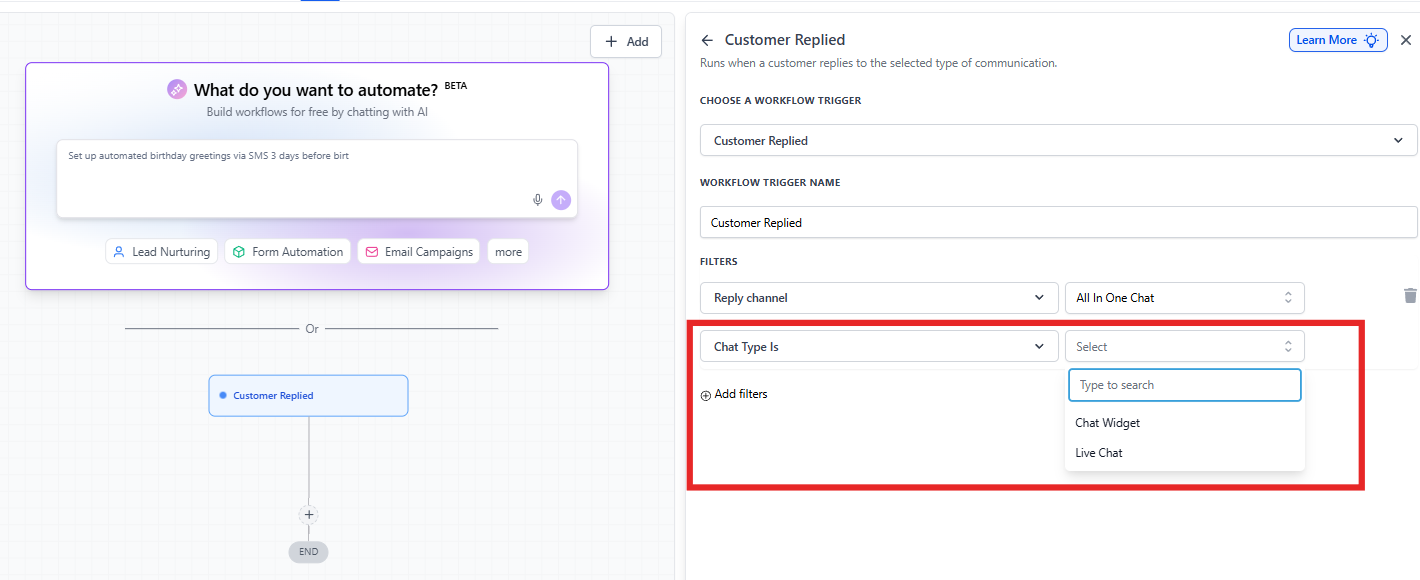
Filter by Chat Type (Chat Widget or Live Chat)
Choose specific All-in-One chat configurations
Build more accurate automations based on reply source
If you manage multiple chat channels, this enhancement makes your workflow setup significantly easier and more structured.
✨ What’s New?
1️⃣ All-in-One Chat Added to Reply Channel
Inside the Customer Replied trigger, you’ll now see:
All In One Chat
Chat Widget
Email
Messenger
Other communication channels
When you select All In One Chat, the system unlocks additional smart filtering options specific to unified chat setups.
2️⃣ Smart Filter Expansion for Better Precision
When Reply Channel = All In One Chat, two additional filters appear automatically.
A. Chat Type Filter
You can now choose:
Chat Widget
Live Chat
This allows you to control whether the reply should come from:
A full All-in-One Chat Widget configuration
Or specifically from Live Chat within that setup
B. Dynamic Third-Level Filter
The next filter adapts based on your Chat Type selection.
If you select:
Chat Type = Chat Widget
→ You’ll see: Chat Widget is (showing only All-in-One chat widgets)Chat Type = Live Chat
→ You’ll see: Live Chat is (showing only All-in-One Live Chat configurations)
This dynamic behavior ensures you only see relevant options no unrelated widgets or confusion.
🛠️ How to Use It
Setting it up is simple:
Go to Automation → Workflows
Add the trigger: Customer Replied
Under Reply Channel, select All In One Chat
Choose Chat Type is: Chat Widget or Live Chat
Select the specific configuration under:
Chat Widget is
or Live Chat is
Click Save Trigger, add your actions, and publish the workflow
Now your workflow will only run when a customer replies through that specific All-in-One Chat configuration.
🎯 Why This Matters
Previously, replies from All-in-One Chat setups weren’t clearly distinguishable. Users often had to create separate triggers for Chat Widget and Live Chat, which made automation setup confusing and harder to manage.
Now:
All-in-One Chat is a dedicated option
Filters are structured and intuitive
Only relevant widgets appear
Setup is cleaner and faster
This means better organization, fewer mistakes, and more accurate automation across your chat channels.
📝 Important Notes
This feature applies only to the Customer Replied trigger.
Existing Chat Widget triggers continue working exactly as before.
No migration is required for existing workflows.
The new option will appear in existing workflows if you want to update them.
The system automatically identifies replies correctly based on channel type.
🛠️ How to Use It
Go to Automation > Workflows and Add trigger: Customer Replied
Under Reply Channel select All In One Chat
Choose Chat Type is: Chat Widget or Live Chat
Select the specific widget under: Chat Widget is or Live Chat is

Solutions
Streamline Sales
Generate More Leads
Build Your Brand
Impress Existing Customers
AutomButtonate Tasks
Company