Create Life Long Clients
ProfitFlo will help you build long lasting client relationships on autopilot!

Create Life Long Clients
ProfitFlo will help you build long lasting client relationships on autopilot!
LATEST NEWS
"Automate Workflows from Inbound Emails"
“Every email is an opportunity now you can act on it instantly.”
- Paul Duncan
📥 Inbound Email Trigger: Automate from the First Message
Your inbox is full of opportunities new leads, support requests, deals in motion. Now, you can act on every single one automatically.
With the new Inbound Email trigger, you can start workflows the moment an email is received in your mailbox whether it’s a cold inquiry, an existing contact, or even replies within a thread.
This means no more manual sorting, delayed responses, or missed opportunities.
⭐ What’s New?
You can now:
Trigger workflows when an inbound email is received
Capture cold emails from new senders (even if they’re not in your CRM yet)
Automate actions for existing contacts and ongoing conversations
Optionally trigger workflows only on new email threads
This gives you full control over how your system reacts to incoming emails in real time.
🎯 Why This Matters
💼 Turn Emails into Leads Instantly
Capture and respond to new inquiries automatically even from unknown senders.
⚡ Speed Up Response Times
No delays. Workflows start the moment the email arrives.
🧠 Smarter Routing
Automatically send emails to the right team (sales, support, billing).
🔄 Automate Repetitive Tasks
Assign contacts, tag conversations, send replies, and trigger follow-ups all hands-free.
⚙️ How It Works
The trigger activates when an inbound email is received and can be refined using multiple filters.
You can control exactly when workflows should run by filtering based on:
Mailbox (where the email was received)
Sender email
CC recipients
Subject line
Email body (plain text)
Presence of attachments
Whether the email is tied to a workflow
Contact tags
You can also choose to trigger workflows only for new conversations, avoiding repeated triggers on the same thread.
🛠 How to Set It Up
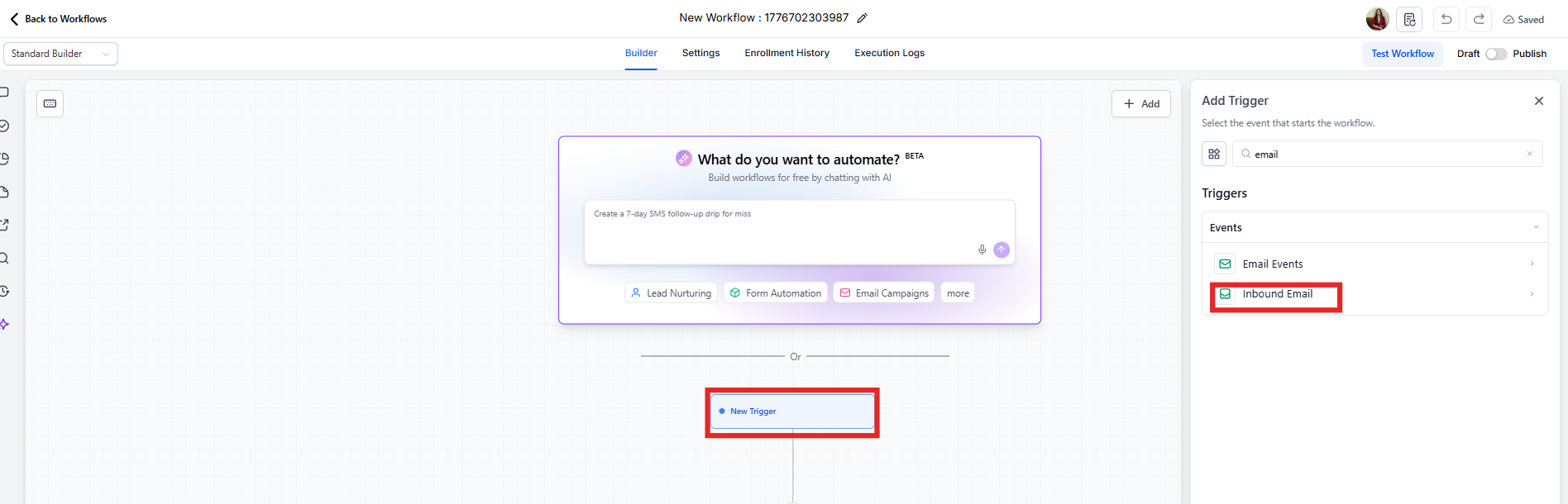
Go to Automations → Workflows
Click Add Trigger
Select Inbound Email
Apply filters based on your needs
Save the trigger
Add actions like:
Create contact
Assign to team member
Add tags
Send notifications
Auto-reply
Once published, your workflow will run automatically when emails match your conditions.
🧩 Powerful Filters & Data
You can use dynamic values from inbound emails to personalize your automations:
Message ID
Subject line
Email body content
Sender email and name
CC recipients
Full email thread content
This allows you to create highly contextual and intelligent workflows.
🧠 Common Use Cases
📬 Inbox Routing
Automatically route emails from:
sales@ → Sales team
support@ → Support team
billing@ → Finance
🏷️ Subject-Based Assignment
Detect keywords like “refund” or “quote” and prioritize or assign accordingly.
📎 Attachment Intake
Trigger workflows only when attachments are included perfect for:
Contracts
Forms
Documents
Proofs
🤖 First-Touch Auto Responses
Send instant replies using the email content to make responses feel more personal and relevant.
⚠️ Important Notes
Full cold inbound email capture is supported for:
LC Email dedicated domains
Mailgun dedicated domains
Not supported for:
Gmail/Outlook two-way sync
Shared domains
Other SMTP setups
This trigger is separate from Customer Replied, and both can run simultaneously
In some cases, an email may match both triggers use filters to control overlap
Each sub-account should use its own dedicated email subdomain to avoid routing issues
✅ Final Thoughts
The Inbound Email trigger transforms your inbox into an automated engine. Instead of reacting manually, your system now responds instantly capturing leads, routing conversations, and starting workflows the moment an email arrives.
Faster responses.
Smarter automation.
More opportunities captured.

Solutions
Streamline Sales
Generate More Leads
Build Your Brand
Impress Existing Customers
AutomButtonate Tasks
Company