Create Life Long Clients
ProfitFlo will help you build long lasting client relationships on autopilot!

Create Life Long Clients
ProfitFlo will help you build long lasting client relationships on autopilot!
LATEST NEWS
"More Control Over Contact Tags"
“Small confirmation. Big protection for your automations.”
- Paul Duncan
🏷️ Improved Tag Management for Contacts
Managing tags is one of the most important parts of automation and now it’s becoming much safer.
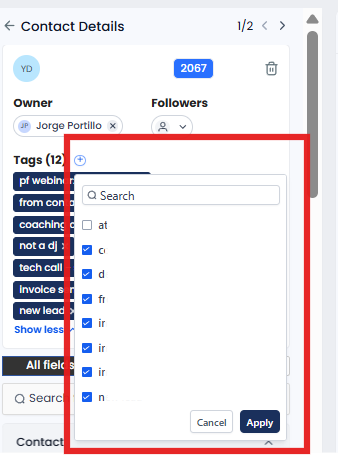
A new update inside the Contacts module introduces double confirmation for adding and removing tags, helping users avoid accidental changes that could unintentionally trigger workflows.
Instead of applying changes instantly, the system now gives users the opportunity to review and confirm updates before they go live.
The result? More confidence, better accuracy, and safer automation management.
⭐ What’s New?
✅ Apply Button for Tag Changes
Tag changes are no longer applied immediately.
Now, after selecting or deselecting tags, users must click Apply to confirm the update.
This helps prevent accidental clicks from instantly affecting contacts or workflows.
❌ Cancel Button for Unintended Changes
Made a mistake while editing tags?
You can now click Cancel to discard changes before they’re applied.
This gives users greater flexibility and peace of mind while managing contacts.
🔒 Double Confirmation for Adding & Removing Tags
Both actions now require confirmation:
Adding new tags
Removing existing tags
This extra confirmation step ensures that workflows only trigger after intentional updates.
⚡ Better Protection Against Accidental Workflow Triggers
Previously, selecting or deselecting a tag instantly updated the contact which could unintentionally launch automations.
With the new system:
Workflows only run after confirmed changes
Accidental triggers are significantly reduced
Contact management becomes safer and more reliable
⚙️ How It Works
Using the updated tag system is simple:
Open the tag dropdown for a contact
Select or deselect the desired tags
The Apply button becomes active
Click Apply to confirm the changes
Or click Cancel if you don’t want to proceed
Only confirmed changes will update the contact and trigger workflows.
🎯 Why This Matters
🧠 More Intentional Automation
Users now have full control before triggering workflows.
⚡ Fewer Mistakes
Prevents accidental contact updates and automation errors.
🔄 Improved Workflow Accuracy
Only purposeful tag changes activate automation logic.
🏢 Better for Growing Businesses
As workflows become more advanced, safer tag management becomes essential.
🚀 What’s Coming Next?
More improvements are already planned for the tag management experience, including:
🗂️ Tag Categories
Organize tags into structured groups for easier management.
🎨 Tag Colors
Quickly identify tags visually with color coding.
👀 Category & Color Visibility
View categories and colors directly inside the tag dropdown.
🔢 Selected Tag Counts
See how many tags are selected within each category for better organization.

Solutions
Streamline Sales
Generate More Leads
Build Your Brand
Impress Existing Customers
AutomButtonate Tasks
Company