Create Life Long Clients
ProfitFlo will help you build long lasting client relationships on autopilot!

Create Life Long Clients
ProfitFlo will help you build long lasting client relationships on autopilot!
LATEST NEWS
"Track Product Cost & Profit Margin Now Built In"
“Stop guessing your profits start tracking them.”
- Paul Duncan
💰 Add & Track Product Cost Price and Margin Now Available
Understanding profitability shouldn’t require external spreadsheets or manual calculations. That’s why you can now define a Cost Price and Margin directly inside each product price or variant.
This update gives businesses a built-in way to track profits at the product level and automatically includes cost data across transactions, invoices, and exports.
⭐ What’s New?
You can now:
Define Cost Price for any product price or variant
Set a Margin in either amount or percentage
Automatically calculate margin values
Export transaction-level cost data
Track profitability directly from your payments system
No extra tools needed.
⚙️ How It Works
Setting it up is simple and flexible.
1️⃣ Add Margin Toggle
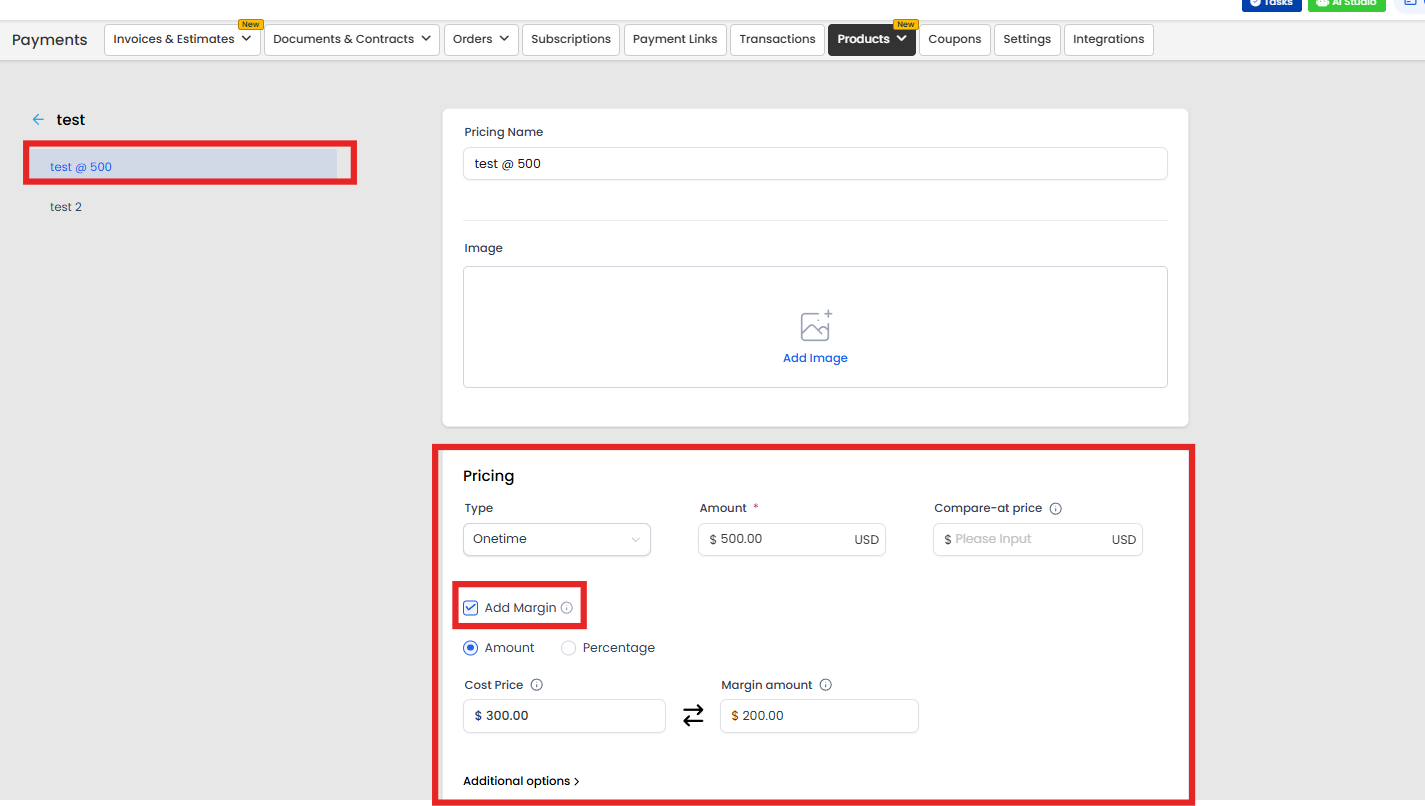
Inside any product price or variant, you’ll see a new “Add Margin” toggle (off by default).
Existing products remain unchanged unless you enable it.
Once turned on, you can enter cost and margin details.
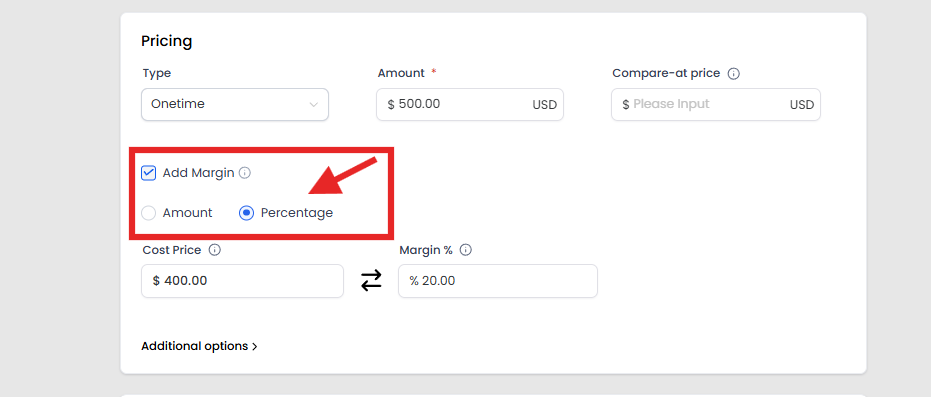
2️⃣ Choose Amount or Percentage Mode
You can define margin in two ways:
Amount Mode (e.g., $50 profit)
Percentage Mode (e.g., 40% margin)
Enter one value, and the system automatically calculates the other based on the selling price.
Even margins above 100% are supported which clearly indicates when your cost exceeds the selling price.
3️⃣ Smart Behavior for Invoices & Calendars
If you manually override pricing on an invoice or calendar:
The Cost Price always pulls from the original product
It does not recalculate dynamically
This ensures consistency and protects your profitability tracking accuracy.
4️⃣ Transaction-Level Profitability Export
A new column called Line Item Cost Price is now available in the Transactions CSV export.
This means you can:
Analyze profit at the transaction level
Build detailed profitability reports
Share financial insights with accounting teams
Track margins across product categories
The column appears automatically when cost price has been defined.
📍 Where to Find It
To configure Cost Price and Margin:
Go to Payments → Products
Create or edit a product
In the Pricing section, enable “Add Margin”
Enter your Cost Price and Margin
To export transaction data:
Go to Payments → Transactions
Click Export CSV
The Line Item Cost Price column will appear automatically
🚀 Why This Matters
📊 Clear Profit Visibility
Know exactly what you’re making on every sale.
🧮 No More Spreadsheets
Track margins directly where sales happen.
💼 Better Business Decisions
Adjust pricing confidently based on real data.
📈 Smarter Scaling
Identify high-margin products and optimize your offers.
🔮 What’s Coming Next?
This is just the beginning. Planned enhancements include:
Bulk editing of cost prices across products
Margin data in additional export types
Expanded cost and margin functionality inside Invoices
More visibility and control are on the way.

Solutions
Streamline Sales
Generate More Leads
Build Your Brand
Impress Existing Customers
AutomButtonate Tasks
Company