Create Life Long Clients
ProfitFlo will help you build long lasting client relationships on autopilot!

Create Life Long Clients
ProfitFlo will help you build long lasting client relationships on autopilot!
LATEST NEWS
"The New AI Workflow Builder Is Here"
“Build smarter workflows with AI that actually shows you how it thinks."
- Paul Duncan
🤖 Meet the New AI Workflow Builder
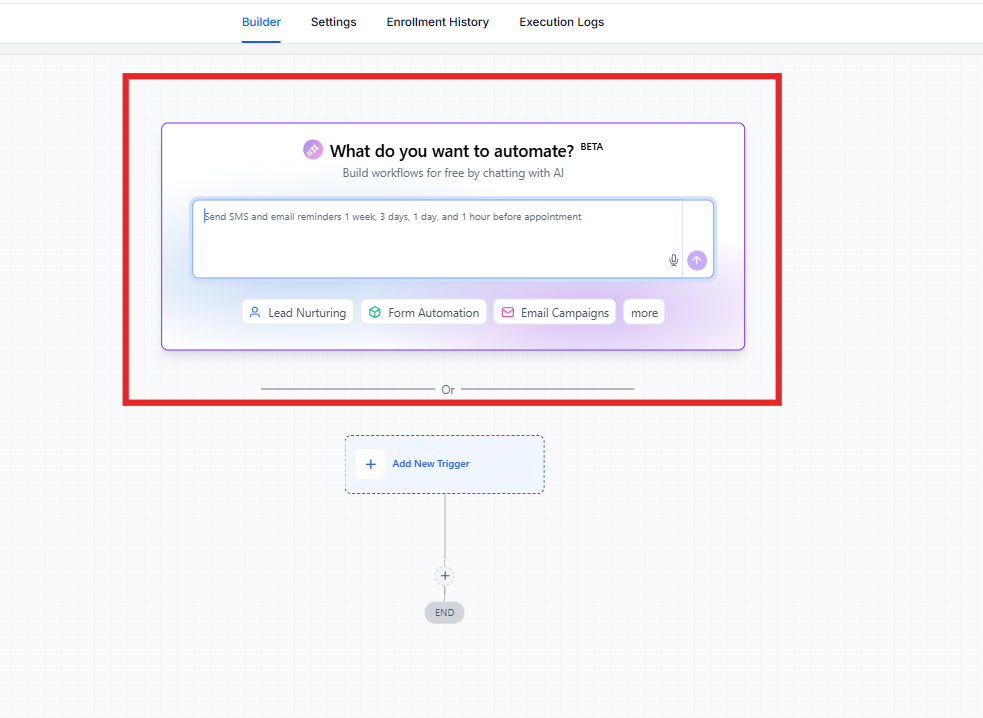
The AI Builder inside workflows has been completely rebuilt from the ground up and this isn’t just an update, it’s a major leap forward.
The new experience introduces a transparent, real-time, context-aware copilot that helps you build, edit, and optimize workflows faster while showing exactly what it’s doing at every step.
Everything is now smarter, faster, and more intuitive.
⭐ What’s New?
⚡ Live Streaming UI
Every action now happens in real time.
As the AI processes your request, you’ll see a step-by-step progress card showing exactly what’s happening:
Asking clarifying questions
Searching for triggers and actions
Building the workflow structure
Placing steps into the canvas
Validating the final result
No more guessing you see everything as it happens.
🔄 Compound Requests in One Step
You’re no longer limited to one change at a time.
Now you can say something like:
“Rename this step, add a 24-hour wait, and turn off re-entry”
And the AI will execute all of it in a single request.
Fewer clicks. Faster results.
🧠 Conversational Memory
The AI now remembers your context throughout the session.
You can say:
“Actually, make that 48 hours”
And it will understand exactly what you mean no need to repeat yourself.
This makes the experience feel more like a real conversation, not a tool.
🧩 Start Fresh or Edit Existing Workflows
When working on a canvas that already has a workflow, the AI will now ask:
Do you want to start fresh
Or edit the existing workflow
This eliminates the need to manually create new workflows just to start over.
🎯 Context-Aware Experience
The AI adapts based on where you are:
Empty canvas → prompts to build from scratch
Existing workflow → suggestions to improve or fix it
Chat mode → knowledge-based guidance
Everything is tailored to your current situation.
💬 Chat to Build in One Click
Ask a question in Chat Mode, and you’ll see a “Continue in Build Mode” button.
Click it, and your request is instantly turned into a workflow no copying or retyping needed.
🔁 Session Continuity
Close the AI panel anytime.
When you reopen it:
Your full conversation is still there
Your progress is saved
You can continue right where you left off
📚 Learn Mode 2.0
Get smarter answers, faster.
Responses stream in real time
Follow-up questions are suggested automatically
Powered by a dedicated knowledge system
This helps you not only build workflows but understand them better.
🚀 Why This Matters
⚡ Faster Workflow Creation
Build and edit workflows in seconds, not minutes.
🔍 Full Transparency
See exactly how the AI is thinking and building.
🧠 Smarter Interactions
Context-aware responses make everything feel natural.
🔄 Scalable Future
A new extensible architecture means future features will roll out faster — and build on what already exists.
🔮 What’s Next?
This is just the beginning.
The new architecture allows for rapid improvements and new capabilities — without rebuilding the system every time.
That means:
Faster updates
More powerful features
Continuous improvement
Expect some exciting updates in the coming weeks.

Solutions
Streamline Sales
Generate More Leads
Build Your Brand
Impress Existing Customers
AutomButtonate Tasks
Company