Create Life Long Clients
ProfitFlo will help you build long lasting client relationships on autopilot!

Create Life Long Clients
ProfitFlo will help you build long lasting client relationships on autopilot!
LATEST NEWS
"Facebook Background Posts Now Inside Social Planner"
“Turn simple text into scroll-stopping content.”
- Paul Duncan
🎨 Facebook Background Posts Are Now Built Into Social Planner
Creating engaging Facebook posts just became faster, easier, and more visual.
Social Planner now supports native Facebook-style background posts, allowing users to create colorful text-only posts directly inside the platform without switching over to Facebook manually.
This means you can now:
Create eye-catching text posts
Choose colorful background styles
Preview them live
Schedule or publish instantly
All from one place.
⭐ What’s New?
🌈 Native Facebook Background Posts
You can now create Facebook-style text posts with colorful native backgrounds directly inside Social Planner.
The feature supports:
Instant publishing
Scheduled publishing
Full integration into the existing post composer
No extra tools. No manual Facebook posting.
🎛️ Background Picker Inside the Composer
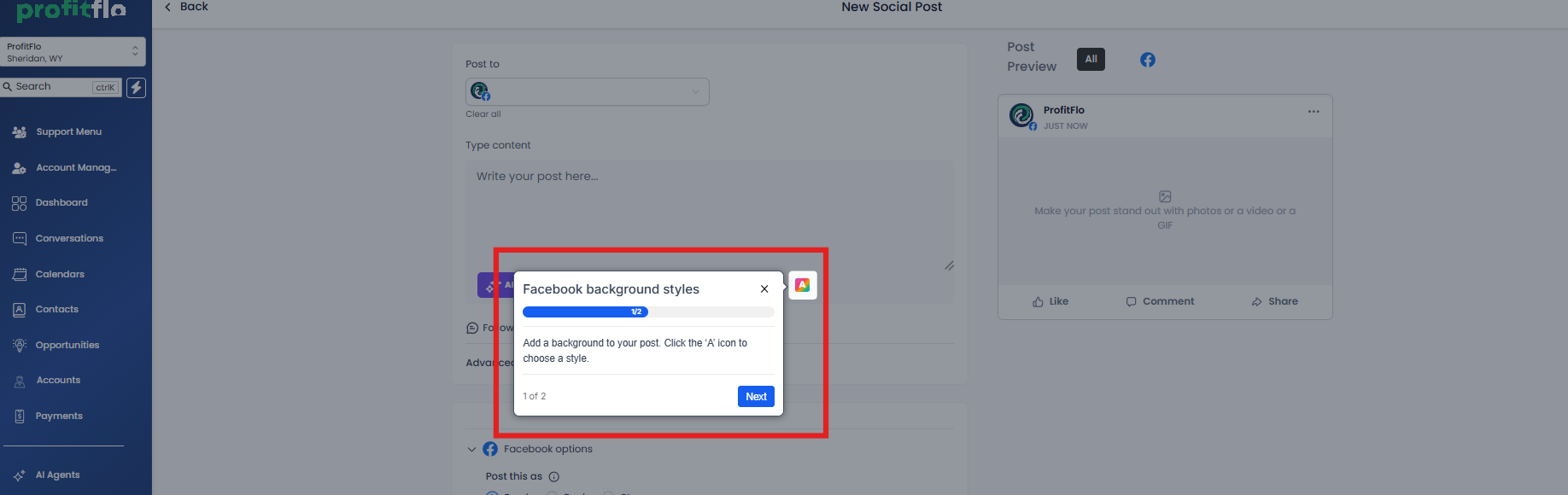
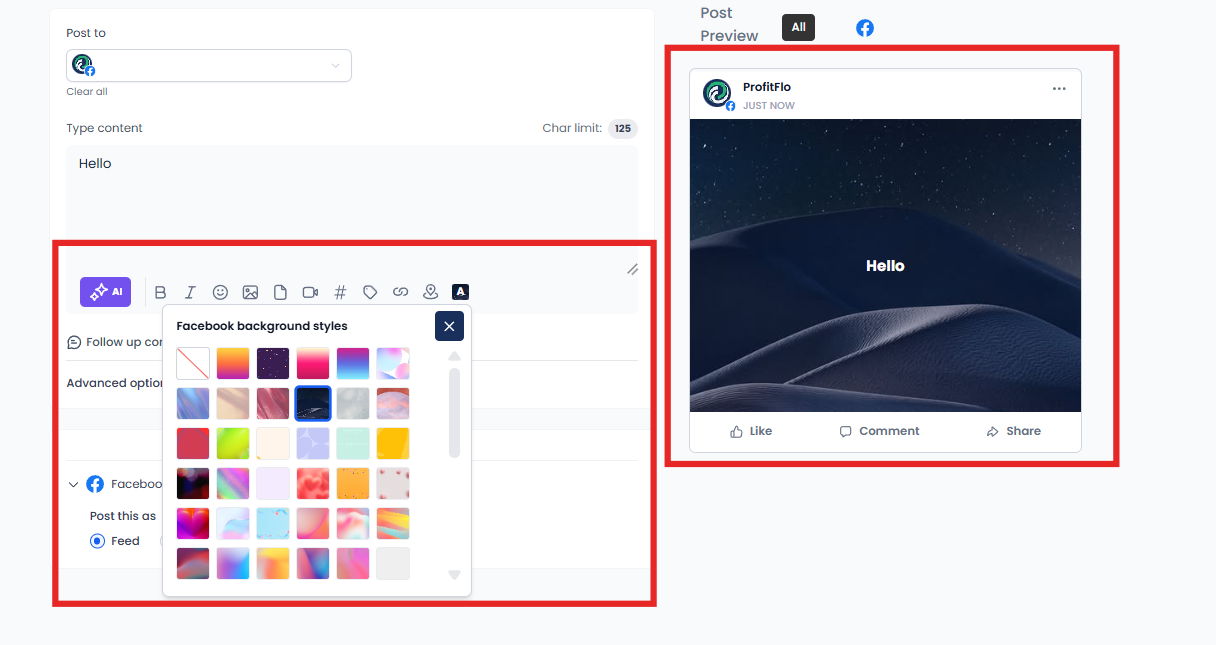
When Facebook is selected as the platform, a new Text Background option appears inside the composer.
Users can:
Browse multiple background presets
Select styles instantly
Preview changes live while editing
This creates a much more visual and interactive posting experience.
👀 Real-Time Facebook-Style Preview
The composer now mirrors Facebook’s native background post experience.
Features include:
Live background previews
Automatic font resizing based on text length
Better visibility into how the final post will appear
This helps users create cleaner and more engaging content before publishing.
⚡ Smart Validation & Auto Handling
The system automatically manages compatibility behind the scenes.
For example:
Backgrounds only work for text-only Facebook posts
Adding images or videos automatically disables background selection
Editing a scheduled post with media removes incompatible backgrounds automatically
Everything is handled intelligently to avoid publishing issues.
🛠️ How to Use It
Getting started is simple:
Go to Marketing → Social Planner
Select Facebook as the platform
Click Text Background
Choose a background preset
Add your caption
Publish immediately or schedule your post
That’s it your Facebook-style background post is ready to go.
🎯 Why This Matters
🚀 Faster Content Creation
Create engaging posts without leaving Social Planner.
👀 More Visibility on Facebook
Colorful text posts naturally stand out in crowded feeds.
⚡ Streamlined Workflow
No need to switch between platforms while creating content.
🏢 Better for Teams & Agencies
Manage branded social content faster and more efficiently.
📌 Important Notes
Backgrounds are supported only for:
Text-only Facebook posts
Adding:
Images
Videos
will automatically disable the background option.

Solutions
Streamline Sales
Generate More Leads
Build Your Brand
Impress Existing Customers
AutomButtonate Tasks
Company